> ## Documentation Index
> Fetch the complete documentation index at: https://docs.taprails.xyz/llms.txt
> Use this file to discover all available pages before exploring further.
# React Native Installation
> Install @taprails/tap-to-pay and set up its native dependencies.
These instructions are specifically for the **React Native SDK**. Building with another framework? See [Supported Frameworks](/guides/frameworks).
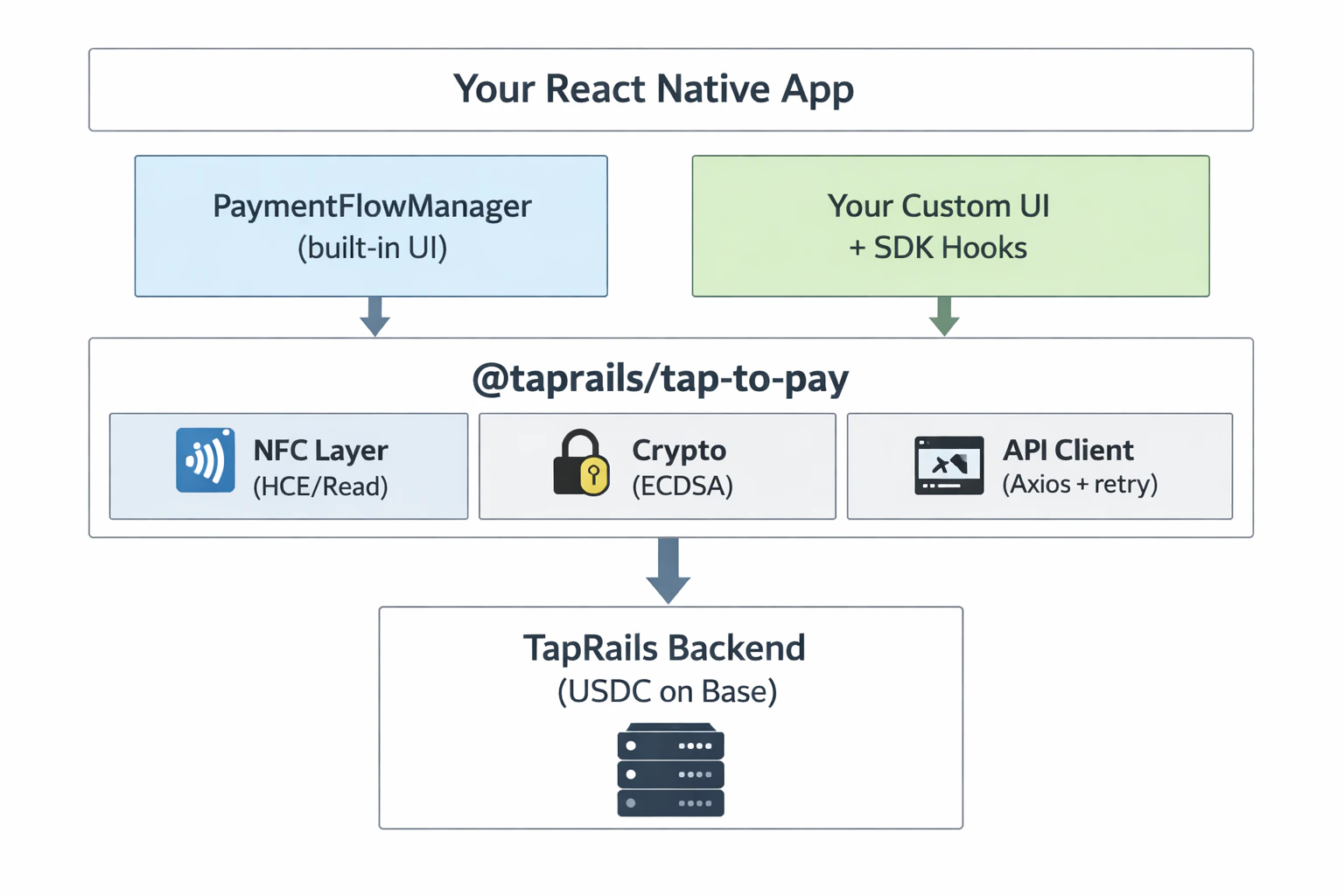
## Architecture Overview
 ***
## Package Installation
```bash npm theme={null}
npm install @taprails/tap-to-pay
```
```bash yarn theme={null}
yarn add @taprails/tap-to-pay
```
***
## Peer Dependencies
The SDK requires these peer dependencies. Install them all:
```bash theme={null}
npm install \
buffer \
react-native-get-random-values@^1.11.0 \
react-native-keychain@^8.2.0 \
react-native-nfc-manager \
react-native-device-info \
react-native-svg \
react-native-reanimated \
react-native-safe-area-context
```
**Version constraints matter:**
* Use `react-native-keychain@^8.2.0` — v10+ requires AndroidX DataStore, which conflicts with React Native 0.72.
* Use `react-native-get-random-values@^1.11.0` — v2+ requires React Native 0.81+.
### What each dependency does
| Package | Purpose |
| -------------------------------- | -------------------------------------------------- |
| `buffer` | NDEF payload Binary ↔ String decoding |
| `react-native-get-random-values` | Secure random number generation for TweetNaCl |
| `react-native-keychain` | Secure device Keychain storage for private keys |
| `react-native-nfc-manager` | NFC tag reading on both platforms |
| `react-native-device-info` | Device UUID and metadata for device registration |
| `react-native-svg` | Icons and animated NFC graphics in the built-in UI |
| `react-native-reanimated` | 60fps animations in payment flow screens |
| `react-native-safe-area-context` | Proper insets for full-screen modal UI |
***
## Polyfills
Add these **at the very top** of your app entry point, before any other imports:
```js index.js theme={null}
import 'react-native-get-random-values';
import { Buffer } from 'buffer';
global.Buffer = Buffer;
```
These must be the **very first lines** in your entry file. React Native's module bundler evaluates them in order — if another module that needs them loads first, you'll get a runtime crash.
***
## Framework Compatibility
| Setup | Supported |
| ------------------------ | ------------------------------ |
| Bare React Native CLI | ✅ Full support |
| Expo (Development Build) | ✅ Supported |
| Expo Go | ❌ Native modules not supported |
If using Expo, you must use a **Development Build** (via `expo-dev-client`). Expo Go does not support native modules like `react-native-keychain` or `react-native-nfc-manager`.
***
## Platform-Specific Setup
Install the SDK and process your first NFC payment in 5 minutes.
Gradle dependencies, AndroidManifest.xml permissions, and HCE service configuration.
CocoaPods and Info.plist NFC usage description.
***
## Package Installation
```bash npm theme={null}
npm install @taprails/tap-to-pay
```
```bash yarn theme={null}
yarn add @taprails/tap-to-pay
```
***
## Peer Dependencies
The SDK requires these peer dependencies. Install them all:
```bash theme={null}
npm install \
buffer \
react-native-get-random-values@^1.11.0 \
react-native-keychain@^8.2.0 \
react-native-nfc-manager \
react-native-device-info \
react-native-svg \
react-native-reanimated \
react-native-safe-area-context
```
**Version constraints matter:**
* Use `react-native-keychain@^8.2.0` — v10+ requires AndroidX DataStore, which conflicts with React Native 0.72.
* Use `react-native-get-random-values@^1.11.0` — v2+ requires React Native 0.81+.
### What each dependency does
| Package | Purpose |
| -------------------------------- | -------------------------------------------------- |
| `buffer` | NDEF payload Binary ↔ String decoding |
| `react-native-get-random-values` | Secure random number generation for TweetNaCl |
| `react-native-keychain` | Secure device Keychain storage for private keys |
| `react-native-nfc-manager` | NFC tag reading on both platforms |
| `react-native-device-info` | Device UUID and metadata for device registration |
| `react-native-svg` | Icons and animated NFC graphics in the built-in UI |
| `react-native-reanimated` | 60fps animations in payment flow screens |
| `react-native-safe-area-context` | Proper insets for full-screen modal UI |
***
## Polyfills
Add these **at the very top** of your app entry point, before any other imports:
```js index.js theme={null}
import 'react-native-get-random-values';
import { Buffer } from 'buffer';
global.Buffer = Buffer;
```
These must be the **very first lines** in your entry file. React Native's module bundler evaluates them in order — if another module that needs them loads first, you'll get a runtime crash.
***
## Framework Compatibility
| Setup | Supported |
| ------------------------ | ------------------------------ |
| Bare React Native CLI | ✅ Full support |
| Expo (Development Build) | ✅ Supported |
| Expo Go | ❌ Native modules not supported |
If using Expo, you must use a **Development Build** (via `expo-dev-client`). Expo Go does not support native modules like `react-native-keychain` or `react-native-nfc-manager`.
***
## Platform-Specific Setup
Install the SDK and process your first NFC payment in 5 minutes.
Gradle dependencies, AndroidManifest.xml permissions, and HCE service configuration.
CocoaPods and Info.plist NFC usage description.